
Download Little Registry Cleaner – registry cleaner, system optimization, Windows utility, PC performance, clean registry
Overview
Little Registry Cleaner is a compact utility tool designed to enhance the performance and stability of Windows-based systems. Its primary function is to identify and remove invalid, outdated, or redundant entries from the Windows registry, which can accumulate over time due to software installations, uninstalls, and system updates. These corrupted or obsolete entries may contribute to system slowdowns, crashes, or startup delays—particularly on older or heavily used machines. By targeting these issues, the app aims to improve overall system responsiveness and reduce potential errors.
Target users include both novice and experienced Windows users seeking a straightforward way to maintain their system health without deep technical knowledge. The app is especially beneficial for individuals managing legacy systems that may have accumulated registry clutter over years of use. It serves as a maintenance tool within the broader ecosystem of system utilities, filling a niche for lightweight, focused optimization software.
Developed by Eddie C. Reardon, the app reflects a focused approach to system cleanup, emphasizing safety and ease of use. Although the developer did not provide additional technical details about the underlying algorithms or scanning methodology, the inclusion of backup functionality before any changes suggests a cautious design philosophy. Real-world use cases include routine system maintenance, troubleshooting performance issues, and preparing older PCs for continued use.
Key Features & Functionality
- Registry Scanning Engine – The app performs a comprehensive scan of the Windows registry to detect invalid, missing, or orphaned entries. This helps identify potential sources of system instability.
- Safe Deletion Process – Only entries confirmed as problematic are flagged for removal, with a built-in safeguard to prevent accidental deletion of essential system data.
- Pre-Change Backup – Before any modifications are made, the tool automatically creates a system restore point or registry backup, allowing users to revert changes if needed.
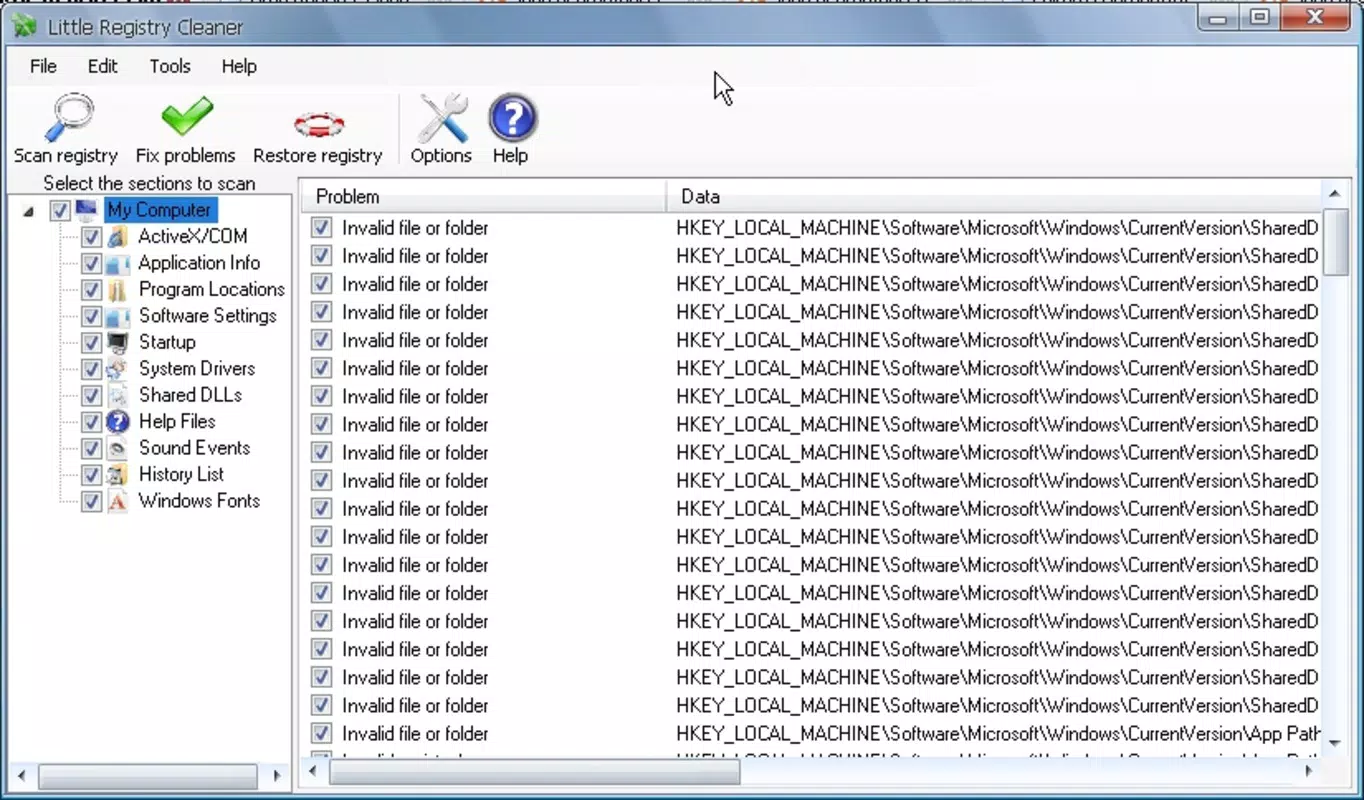
- Intuitive User Interface – Designed with simplicity in mind, the interface guides users through scanning, reviewing results, and executing cleanup actions with minimal steps.
- Lightweight Operation – With a file size of just 2.1 MB, the app imposes minimal resource usage, making it suitable for systems with limited storage or processing power.
For example, a user experiencing slow boot times might run a scan, review the list of detected issues, and safely remove outdated entries related to uninstalled software. Similarly, a technician maintaining multiple older PCs could use the tool as part of a standard maintenance routine. The backup feature ensures that even if an unexpected issue arises, the system can be restored to its prior state.
Interface, UX & Performance
The interface of Little Registry Cleaner is designed with usability as a priority. It features a clean layout with clearly labeled sections, including a scan status indicator, a results summary, and a confirmation dialog before any deletion. Navigation is linear and straightforward: scan → review → clean → backup. This flow minimizes user confusion and reduces the risk of accidental modifications.
Visual elements are minimal but functional, using standard Windows UI components to maintain consistency with the operating system. There are no distracting animations or excessive graphics, which supports the app’s lightweight nature. The design prioritizes clarity over aesthetics, ensuring that users can focus on the task at hand.
Although the developer did not list formal performance metrics, the app’s small file size and focused functionality suggest efficient operation. It is expected to run smoothly on a range of Windows systems, including those with older hardware. Responsiveness appears consistent across different device categories, though specific benchmarks were not disclosed. Stability is implied by the inclusion of backup mechanisms and cautious deletion logic.
Platform Compatibility & Technical Requirements
Little Registry Cleaner is designed exclusively for Windows operating systems. The app is available in a version 1.0.1 format, with a file size of 2.1 MB. The developer did not specify minimum OS requirements or compatibility details beyond the platform name.
Given the app’s focus on registry manipulation, it is likely intended for desktop or laptop systems running modern Windows versions. However, compatibility with specific Windows editions (such as Home, Pro, or Enterprise) was not confirmed. Users should ensure their system meets standard Windows requirements for running executable tools, particularly those with administrative privileges.
Pros and Cons
Pros
- Lightweight design with minimal system footprint
- Simple, intuitive interface suitable for beginners
- Includes backup functionality before any changes
- Targets registry issues that can affect system performance
- Designed for both casual users and those with moderate technical knowledge
Cons
- Developer did not provide detailed technical specifications
- Compatibility with specific Windows versions was not listed
- No information on automatic update mechanisms
- Price point may be considered high for a single-purpose tool
- Does not include advanced features like scheduled scans or real-time monitoring
FAQ
Is Little Registry Cleaner safe to use?
Yes, the app includes a backup feature before making any changes to the registry. This allows users to restore the system if an issue occurs after cleanup.
Can I use this tool on older Windows systems?
While the developer did not specify compatibility details, the app’s lightweight design suggests it may work on older Windows versions. Users should verify system requirements before installation.
Does the app require administrative privileges?
Given its access to the Windows registry, it is likely that administrative rights are required to run the tool and apply changes.
How often should I run a registry scan?
There is no fixed schedule. Users may run the scan when experiencing performance issues or as part of routine system maintenance.
Is there a free version available?
Currently, the app is available for a one-time purchase of $4.99. No free or trial version was mentioned in the provided information.
Final Thoughts
Little Registry Cleaner offers a focused, no-frills solution for users seeking to maintain their Windows systems through registry optimization. Its minimalist design, combined with safety features like backups, makes it a reliable choice for both casual users and those managing older machines. While it lacks advanced automation and detailed technical transparency, its core functionality is well-executed and purpose-built.
For individuals looking to improve PC performance without installing heavy software suites, this tool presents a practical alternative. It fills a specific need in the system utility space with a clear value proposition: clean, safe, and efficient registry maintenance.
Download Little Registry Cleaner now


